

Self-hosted messaging is a communication model in which an organization runs its messaging platform on infrastructure it controls instead of relying entirely on a vendor operated public cloud. It is mainly used by organizations that need greater control over message storage, identity, integrations, retention, network access, and communication data.
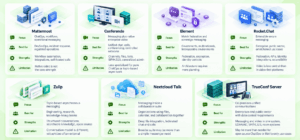
The strongest self-hosted messaging platforms differ less by whether they support basic chat and more by their architecture. Mattermost is built around operational messaging and workflows. Conferendo combines messaging with native enterprise video and calling. Element uses the open Matrix protocol for encrypted and federated communication. Rocket.Chat emphasizes secure messaging, extensibility, federation, and isolated deployment. Zulip focuses on topic based asynchronous communication. Nextcloud Talk integrates messaging with a broader self-hosted collaboration suite.
For most enterprise buyers, the first decision should be whether they need messaging only, messaging plus workflow automation, messaging plus native video communication, open federation between organizations, or a complete self managed collaboration environment.
Executive Summary: Self-Hosted Messaging at a Glance
|
Platform |
Primary Focus |
Deployment |
Best For |
|---|---|---|---|
|
Mattermost |
Operational messaging and workflows |
Self-hosted, private cloud, isolated environments |
DevSecOps, incident response, regulated operations |
|
Conferendo |
Messaging plus enterprise video communications |
On-premises and private networks |
Organizations that need chat, channels, files, calls, and conferencing in one system |
|
Element |
Federated secure messaging |
Self-hosted or managed |
Digital sovereignty and cross organization federation |
|
Rocket.Chat |
Secure messaging and extensibility |
Self-managed, cloud, isolated deployment |
Government, regulated enterprises, extensible messaging |
|
Zulip |
Topic organized asynchronous messaging |
Self-hosted or cloud |
Engineering, research, and knowledge intensive teams |
|
Nextcloud Talk |
Messaging integrated with files and collaboration |
Fully self-hosted |
Organizations already using or considering Nextcloud |
|
TrueConf Server |
On-premises messaging plus enterprise video communications |
Self-hosted on company controlled infrastructure |
Organizations that need chat, video conferencing, directory integration, and SIP/H.323 interoperability |
Reviewed Platforms Shortlist
- Mattermost: best suited to operational messaging, ChatOps, incident response, workflow automation, and regulated environments.
- Conferendo: strong fit when messaging needs to coexist with native video conferencing, voice communication, presence, channels, and standards based video infrastructure.
- Element: strongest when open federation, Matrix interoperability, encrypted communication, and sovereignty are central requirements.
- Rocket.Chat: broad secure messaging platform with self managed deployment, federation, omnichannel capabilities, and extensibility.
- Zulip: distinctive option for teams that value topic based organization and long lived searchable knowledge.
- Nextcloud Talk: best evaluated as part of a broader Nextcloud collaboration environment with files, calendar, and communication in one self managed stack.
- TrueConf Server: on-premises team messaging with native video conferencing, directory integration, private network operation, and SIP/H.323 interoperability.
What Is Self-Hosted Messaging?

A self-hosted messaging platform is a chat or collaboration system that an organization installs and operates on infrastructure under its control. The infrastructure may be located in an internal data center, private cloud, sovereign cloud, virtual machines, Kubernetes environment, or an isolated network.
The defining difference is operational control. With conventional cloud messaging, the vendor operates the application infrastructure and determines much of the underlying storage, update, and service architecture. With self-hosted messaging, the customer makes more of those decisions directly.
Self hosting does not automatically make communication secure. Security depends on configuration, identity management, patching, backup design, access policies, endpoint security, encryption architecture, monitoring, and administrator practices. What self hosting provides is the ability to control more of those layers.
Self-Hosted vs. Private vs. Federated Messaging
Several messaging terms are often used as though they describe the same architecture. They answer different questions and can exist together in the same product.
|
Term |
Meaning |
What It Does Not Guarantee |
|---|---|---|
|
Self-hosted messaging |
The organization operates or controls the messaging infrastructure |
It does not automatically guarantee encryption, good security configuration, or federation |
|
Private messaging |
Communication is restricted to authorized participants or a defined organization |
The infrastructure may still be operated by a public cloud vendor |
|
Federated messaging |
Independently operated messaging servers can communicate with one another |
Federation does not mean every participant runs the same server or shares one administrator |
|
End to end encrypted messaging |
Message content is encrypted between participating endpoints according to the implementation |
It does not by itself define server ownership, retention, identity, or metadata handling |
For example, an organization can run a self-hosted messenger that is private but not federated. A Matrix deployment can be self-hosted, federated, and end to end encrypted at the same time. A vendor hosted application can offer private encrypted conversations without being self-hosted.
Self-Hosted Messaging Deployment Models
Self-hosted messaging is not one fixed infrastructure model. Organizations can choose different deployment patterns depending on control requirements, geographic distribution, internal skills, and network restrictions.
|
Deployment Model |
How It Works? |
Typical Fit |
Main Tradeoff |
|---|---|---|---|
|
On-premises |
Messaging servers run in the organization’s own data center or server room |
Regulated enterprises, government, internal corporate networks |
Maximum operational responsibility for infrastructure |
|
Private cloud |
The application runs in infrastructure dedicated to the organization within a cloud environment |
Distributed enterprises that need more infrastructure control without maintaining physical servers |
Cloud infrastructure is still part of the trust and availability model |
|
Isolated network |
Messaging operates inside a network with restricted or no public internet connectivity |
Defense, critical infrastructure, sensitive internal networks |
External integrations, mobile notifications, and software updates require additional planning |
|
Managed private deployment |
Dedicated infrastructure is operated with assistance from a vendor or infrastructure partner |
Organizations that need stronger control but want to reduce internal operational workload |
Some operational responsibility remains with a third party |
Why Organizations Choose Self-Hosted Messaging?
The strongest reasons to self host messaging are usually connected to governance rather than basic chat functionality.
- Data control: messages, files, user directories, and communication metadata can remain in infrastructure selected by the organization.
- Private network operation: some platforms can operate without making a public cloud service part of the communication path.
- Identity integration: enterprises can connect messaging to internal LDAP, Active Directory, SAML, OIDC, or other identity systems.
- Retention and audit control: organizations can align message retention, logs, exports, and backups with internal governance requirements.
- Customization: APIs, webhooks, bots, plugins, federation, and custom workflows can be integrated with internal systems.
- Supplier independence: open standards and self managed data can reduce some forms of platform lock in.
The tradeoff is operational responsibility. The customer must plan deployment, updates, monitoring, backup, capacity, redundancy, and incident response instead of assuming the messaging vendor handles those functions.
Current Self-Hosted Messaging Adoption Signals
There is no authoritative global market share dataset specifically for self-hosted messaging. Private enterprise deployments are often invisible to public telemetry, and vendors measure adoption differently. Ecosystem deployment figures are therefore the most useful available proxy for understanding how widely customer controlled messaging and collaboration architectures are being used.
|
Self-Hosted Messaging Signal |
Reported Figure |
Why It Matters? |
|---|---|---|
|
Element and Matrix |
Element reports more than 125 million users and more than 100,000 deployments across the Matrix ecosystem |
Shows that federated and customer controlled messaging can operate at government and enterprise scale |
|
Nextcloud self managed infrastructure |
Nextcloud documentation reports more than 400,000 deployments, while company updates have described more than 500,000 servers in operation |
Shows a large installed base for self managed collaboration infrastructure that can include messaging through Nextcloud Talk |
|
Nextcloud professional adoption |
Nextcloud reported more than two million new professional users over a twelve month period |
Indicates that self managed workplace infrastructure is being adopted beyond small technical deployments |
|
Matrix public sector adoption |
The Matrix ecosystem reports increasing use across European public sector organizations |
Shows that open federation and sovereign messaging are becoming institutional procurement requirements |
These figures should be read as adoption signals, not as comparable vendor market share. They demonstrate that self-hosted, sovereign, and federated communication architectures have moved beyond small internal IT projects and are being used in large professional and institutional environments.
Core Capabilities to Compare
|
Capability |
Why It Matters? |
Questions to Ask |
|---|---|---|
|
Messaging structure |
Determines how teams organize daily communication |
Channels, rooms, topics, threads, direct messages, broadcast channels? |
|
Identity |
Controls onboarding and access |
LDAP, Active Directory, SAML, OIDC, SCIM? |
|
Voice and video |
Determines whether another meeting platform is required |
Native calls or external integrations? |
|
Federation |
Enables controlled communication across organizations |
Can independently managed servers communicate? |
|
Automation |
Connects messaging to operational workflows |
Bots, webhooks, APIs, plugins, workflow engine? |
|
Audit and retention |
Supports governance and investigation |
Can retention and exports be controlled centrally? |
|
Offline or isolated deployment |
Important for restricted networks |
Does the product require external cloud services to function? |
|
Client coverage |
Affects adoption |
Web, Windows, macOS, Linux, Android, iOS? |
Best Self-Hosted Messaging Platforms
1. Mattermost
Mattermost is a self-hosted collaboration platform focused on messaging, operational coordination, ChatOps, incident response, and controlled enterprise environments. Its Channels product supports direct messages, group messaging, public and private channels, threaded conversations, file sharing, search, notifications, and cross platform access.
The platform becomes more distinctive when messaging is connected to operational workflows. Mattermost Playbooks supports repeatable checklists, task assignments, status updates, workflow automation, timelines, metrics, and retrospectives.
Mattermost Calls provides self-hosted audio calls and screen sharing. Mattermost also exposes REST APIs, webhooks, slash commands, bots, plugins, and integrations with development, ITSM, monitoring, and incident management systems.
Best for: DevSecOps, mission critical operations, incident response, security teams, regulated enterprises, and organizations where messaging needs to drive repeatable operational workflows.
Strengths: mature channel messaging, workflow automation, self-hosted calls, extensive integrations, audit and security capabilities, and operational workflow support.
Limitations: Mattermost is strongest as an operational messaging platform. Organizations whose primary requirement is large scale native video conferencing may prefer a communication platform where video is a core product layer.
2. Conferendo
Conferendo combines a team messenger with enterprise video conferencing and calling in one server environment. Its messaging capabilities include personal and group chats, channels, chat folders, message editing and forwarding, mentions, formatting, moderator controls, ownership transfer, file exchange, read status, and user presence.
The main differentiator is native video infrastructure. Conferendo supports large group conferences, browser access, conference streaming, and built in SIP and H.323 interoperability for third party video systems and MCUs.
The platform is therefore relevant when messaging must coexist with room systems, video endpoints, internal calling, and centralized conferencing rather than being connected to a separate meeting service.
Conferendo also provides an entry point for organizations that want to evaluate personal and group chats, presence, file storage, chatbots, and video communication before planning a larger deployment.
Best for: organizations that want messaging, channels, files, voice, video conferencing, room system interoperability, and internal network communication in one platform.
Strengths: messaging and video in one system, SIP and H.323 support, channels, files, bots, presence, enterprise video conferencing, and centralized administration.
Limitations: organizations looking primarily for software development ChatOps or highly specialized topic based asynchronous discussion may prefer platforms built specifically around those workflows.
3. Element
Element is built on Matrix, an open standard for decentralized real time communications. Element Server Suite can be deployed on customer infrastructure or delivered as a managed service. Enterprise editions add capabilities such as autoscaling, multi tenancy, identity management, auditing, security updates, role based controls, and federation management.
The platform supports encrypted messaging, voice, and video. Administrators can manage users, devices, rooms, registration, policies, moderation, and federation. Enterprise deployments can connect to Active Directory, LDAP, SCIM, and SSO systems.
Federation is Element’s most important architectural differentiator. Different organizations can operate their own Matrix servers while still communicating across controlled boundaries.
Best for: governments, multinational organizations, federated institutions, and enterprises that prioritize open standards, interoperability, encrypted messaging, and sovereignty.
Strengths: Matrix federation, encrypted communications, open protocol, extensive administration, identity integration, device controls, and cross organization interoperability.
Limitations: Matrix architecture offers substantial flexibility, but professional deployments may require careful planning around homeservers, federation, gateways, identity, and calling infrastructure.
4. Rocket.Chat
Rocket.Chat is a secure collaboration platform with channels, teams, direct messages, discussions, threads, file sharing, search, and multimedia communication. Its architecture is particularly relevant to organizations that need messaging extensibility and controlled communication between teams or organizations.
Rocket.Chat also extends beyond internal team messaging. Its Omnichannel capabilities can bring customer communication into an agent workspace, while its Apps Engine and APIs allow organizations to build private applications and integrations.
For identity and governance, Rocket.Chat supports options including LDAP, SAML, OAuth, OpenID Connect, role based access, audit capabilities, retention policies, and encrypted communication, with availability depending on product edition.
Best for: enterprises and public sector organizations that need extensible messaging, federation, identity controls, or customer engagement alongside internal messaging.
Strengths: channels and threads, federation, extensibility, omnichannel communication, identity integrations, access controls, and flexible integration architecture.
Limitations: video communication is less central to the architecture than on platforms designed around enterprise video conferencing.
5. Zulip
Zulip is an open source team messaging platform with a distinctive topic based conversation model. Instead of treating each channel as one continuous stream, Zulip organizes messages inside channels and topics, allowing multiple focused discussions to happen in parallel without losing context.
This structure is particularly useful for engineering, research, open source, and distributed teams where employees need to return to discussions hours or days later.
Zulip supports web, desktop, mobile, and terminal clients, channels, file sharing, message history, topic based threading, configurable notifications, and user administration.
Best for: engineering, research, open source, education, and knowledge intensive teams that need highly structured asynchronous discussion.
Strengths: topic based threading, searchable knowledge, open source software, broad integration support, desktop and mobile clients.
Limitations: Zulip’s conversation model is intentionally different from conventional channel chat and may require user adaptation. Voice and video typically depend on external providers.
6. Nextcloud Talk
Nextcloud Talk is a text, voice, and video communication component within the broader Nextcloud collaboration platform. It integrates messaging with files, calendar, content collaboration, and other Nextcloud applications rather than operating as an isolated chat product.
Talk supports text conversations, attachments, audio and video calls, screen sharing, recording, transcription, guest participation, breakout rooms, bots, and commands. It is available through web, desktop, Android, and iOS clients.
Federated communication allows users on different Nextcloud servers to participate in chats and calls while each organization retains its own environment.
Best for: organizations seeking a digital workplace that combines messaging, video calls, files, calendar, document collaboration, and data control.
Strengths: deep file integration, federated chat and calls, browser and mobile clients, document collaboration, guest participation, and a broad collaboration ecosystem.
Limitations: Nextcloud Talk is strongest when used as part of Nextcloud Hub. Organizations looking only for lightweight standalone messaging may find the wider platform larger than necessary.
7. TrueConf Server
TrueConf Server is an on-premises unified communications platform that combines corporate messaging with native video conferencing, calling, presence, file exchange, and centralized administration. Its messaging environment includes personal and group chats, channels, replies, mentions, message forwarding, file sharing, search, and synchronized history across user devices.
For enterprise infrastructure, TrueConf Server supports LDAP and LDAPS integration, including Microsoft Active Directory, and includes a built in SIP/H.323/RTSP gateway for interoperability with PBXs, standards based video endpoints, MCUs, IP cameras, and other communication systems. The commercial version can operate inside a private corporate network without a permanent internet connection.
Best for: enterprises and public sector organizations that want self-hosted messaging, native video conferencing, directory integration, and standards based interoperability in one locally controlled environment.
Strengths: messaging and video in one system, private network operation, LDAP and Active Directory integration, SIP and H.323 interoperability, browser participation, desktop and mobile clients, and room system support.
Limitations: organizations focused primarily on open source ChatOps or Matrix based federation may prefer platforms designed specifically around those architectures.
Self-Hosted Messaging Platforms Compared
|
Platform |
Messaging Model |
Voice/Video |
Federation |
Identity Integration |
Distinctive Strength |
|---|---|---|---|---|---|
|
Mattermost |
Channels, DMs, threads |
Native audio and screen sharing, video integrations |
Not the primary architecture |
Enterprise directory and SSO options |
Operational workflows and ChatOps |
|
Conferendo |
Chats, groups, channels |
Native voice and enterprise video conferencing |
Cross organization communication depends on deployment architecture |
Enterprise directory integration |
Messaging plus native video infrastructure |
|
Element |
Matrix rooms, spaces, threads |
Voice and video |
Core capability |
AD, LDAP, SCIM, SSO |
Open federation |
|
Rocket.Chat |
Channels, teams, discussions, threads |
Voice and conference integrations |
Federated communication supported |
LDAP, SAML, OAuth, OIDC |
Extensibility and cross organization messaging |
|
Zulip |
Channels plus topics |
External call providers |
Not a primary federation platform |
Enterprise authentication options |
Topic organized knowledge |
|
Nextcloud Talk |
Conversations and chat |
Native calls and video |
Federated communication |
Nextcloud identity ecosystem |
Messaging plus files and collaboration |
|
TrueConf Server |
Personal chats, group chats, channels |
Native voice and enterprise video conferencing |
Server federation supported |
AD, LDAP, enterprise authentication |
Local messaging plus video and SIP/H.323 interoperability |
Self-Hosted Messaging vs. Cloud Messaging
|
Area |
Self-Hosted Messaging |
Vendor Hosted Messaging |
|---|---|---|
|
Infrastructure |
Customer operates or selects infrastructure |
Vendor operates core infrastructure |
|
Data location |
Defined by customer architecture |
Limited to vendor regions and service architecture |
|
Updates |
Customer controls maintenance schedule |
Vendor controls most service updates |
|
Customization |
Potentially extensive |
Usually limited to supported APIs and marketplace options |
|
Scaling |
Requires infrastructure planning |
Typically abstracted by the provider |
|
Offline network operation |
Possible with selected products |
Usually not possible |
|
Operational burden |
Higher |
Lower |
Security Features That Matter Most
- Authentication and identity: determine whether the platform integrates with existing corporate identity and supports centralized account lifecycle management.
- Encryption: verify encryption for transport, stored data, files, calls, and where applicable end to end encrypted conversations.
- Administrator controls: review roles, room or channel access, device revocation, guest permissions, federation rules, and moderation.
- Auditability: confirm which events can be logged, retained, exported, and sent to internal monitoring systems.
- Data retention: understand how long messages, files, recordings, and deleted content remain available.
- Network dependencies: identify any external push, media, identity, analytics, or update services required for normal operation.
How to Choose a Self-Hosted Messaging Platform?
|
If Your Priority Is |
Evaluate First |
Why? |
|---|---|---|
|
ChatOps and incident workflows |
Mattermost |
Messaging, automation, Playbooks, and operational integrations |
|
Messaging plus enterprise video |
Conferendo |
Native chat, channels, calling, conferencing, SIP and H.323 |
|
Cross organization federation |
Element |
Matrix is built around decentralized federation |
|
Extensible secure messaging |
Rocket.Chat |
Apps, APIs, omnichannel capabilities, federation |
|
Structured asynchronous discussion |
Zulip |
Topic based conversation model |
|
Files plus communication |
Nextcloud Talk |
Messaging and calls integrated with the broader Nextcloud workspace |
|
Traditional on-premises team chat |
TrueConf Server |
Familiar messaging plus calls and enterprise directory integration |
Key Takeaways
- Self-hosted messaging gives an organization more control over infrastructure, data location, identity, integrations, retention, and network dependencies.
- Mattermost is strongest when messaging is tied to operations, incident response, and workflow automation.
- Conferendo is particularly relevant when messaging and native enterprise video conferencing need to operate in the same communication environment.
- Element is differentiated by Matrix federation and open standards, while Rocket.Chat emphasizes extensibility and cross organization messaging.
- Self-hosting and security are separate considerations. Greater infrastructure control still requires disciplined patching, backup, identity, monitoring, and recovery processes.
- The best platform is the one whose communication model and operational responsibilities match the organization’s actual requirements.
Conclusion
Self-hosted messaging is most valuable when communication infrastructure itself is part of the organization’s security, sovereignty, integration, or operational requirements. The best platform therefore depends less on whether it can send messages and more on how messaging fits into identity, video communication, workflow automation, federation, files, compliance processes, and internal infrastructure.
Mattermost, Conferendo, Element, Rocket.Chat, Zulip, Nextcloud Talk, and TrueConf Server represent different approaches to the category. Mattermost focuses on operational workflows, Conferendo combines messaging with native enterprise video, Element emphasizes federated Matrix communication, Rocket.Chat focuses on extensibility, Zulip organizes asynchronous knowledge around topics, and Nextcloud Talk embeds messaging inside a wider collaboration environment. The best choice is the architecture that matches the organization’s actual communication model and the operational responsibilities it is prepared to own.
FAQ
What is self-hosted messaging?
Self-hosted messaging is a communication system that runs on infrastructure selected and operated by the organization instead of relying entirely on a vendor operated public cloud. This gives the organization more control over data storage, identity, integrations, retention, networking, and system administration.
Is self-hosted messaging more secure than cloud messaging?
Not automatically. Self hosting provides more control, but the organization also becomes responsible for configuration, updates, backups, monitoring, access control, certificates, and infrastructure security. A well managed cloud service can be safer than a poorly maintained private server.
What is the best self-hosted messaging platform for enterprise use?
There is no universal best platform. Mattermost is strong for operational workflows, Conferendo for messaging combined with native enterprise video, Element for federation, Rocket.Chat for extensibility and secure deployment, Zulip for topic organized communication, and Nextcloud Talk for integrated collaboration.
Can self-hosted messaging work without internet access?
Some products can operate inside isolated networks, but this depends on the complete deployment architecture. Administrators should verify mobile push services, identity providers, update systems, call infrastructure, integrations, and other external dependencies rather than checking only whether the message server is local.
What is the difference between self-hosted messaging and federated messaging?
Self hosting means an organization operates its own messaging infrastructure. Federation means independently operated servers can communicate with one another. A platform can support both models, but neither one automatically implies the other.
Do self-hosted messengers support video calls?
Many do, but implementation differs significantly. Conferendo and Nextcloud Talk include video communication as part of their collaboration environments, while other platforms may use separate calling components or external conferencing integrations.
What infrastructure is required for self-hosted messaging?
Requirements depend on user count, message volume, file storage, search, calls, redundancy, and retention. Production deployments typically need application servers, a database, storage, backups, monitoring, TLS certificates, identity integration, and a documented update and recovery process.