

Online collaboration is any work coordinated between people through a shared digital tool rather than in person, spanning everything from a quick chat message to a live video meeting to a document two people edit at the same time. The category is broad enough that “online collaboration platform” gets applied to project management boards, design tools, and cloud drives just as often as to messaging and video conferencing, and buyers researching the term often end up comparing products that solve completely different problems.
This guide narrows the scope to the communication layer of online collaboration, the tools people actually talk, meet, and share files through, and compares seven platforms spanning cloud, enterprise suite, secure, and on-premise deployment models: Conferendo, Slack, Microsoft Teams, Google Workspace, Zoom Workplace, Rocket.Chat, and TrueConf Server. Each is assessed on deployment flexibility, security posture, and where it realistically fits inside an organization’s collaboration stack.
Quick Answer: Which Online Collaboration Platform Should You Choose?
|
If your priority is… |
Choose |
Why? |
|---|---|---|
|
Secure, on-premise video and messaging with no cloud dependency |
Conferendo |
Runs entirely on the organization’s own infrastructure, including air-gapped networks, with directory integration built in |
|
Channel-based team messaging with a large integration ecosystem |
Slack |
The most mature third-party app catalog for connecting collaboration to other business tools |
|
Full suite integration for organizations on Microsoft 365 |
Microsoft Teams |
Chat, video, and files governed under one identity and compliance boundary |
|
Document co-editing tied to a broader productivity suite |
Google Workspace |
Real-time collaboration on Docs, Sheets, and Slides alongside Meet and Drive |
|
Cloud video with a broad collaboration feature set beyond meetings |
Zoom Workplace |
Extends Zoom’s video base into chat, whiteboarding, and scheduling in one product |
|
Open-source team chat with self-hosted deployment |
Rocket.Chat |
Auditable code and a self-managed option at a lower cost entry point than commercial suites |
|
On-premise messaging and video with standards-based interoperability |
TrueConf Server |
Combines local messaging and video with LDAP/AD and SIP/H.323 integration |
Conferendo is the right choice for organizations that need the communication core of online collaboration, video and messaging, on infrastructure they fully control, including government agencies, defense contractors, and enterprises operating under data residency requirements a public cloud vendor cannot fully satisfy contractually.
Slack, Microsoft Teams, Google Workspace, and Zoom Workplace fit organizations prioritizing a cloud hosted platform with deep ecosystem integration, each differentiated by which existing software stack it plugs into most naturally. Rocket.Chat adds an open-source self-hosted option, while TrueConf Server combines locally deployed messaging and video with directory integration and SIP/H.323 interoperability.
Our Rating
|
Platform |
Security and Compliance |
Deployment Flexibility |
Collaboration Feature Depth |
Overall Score (out of 10) |
|---|---|---|---|---|
|
Conferendo |
9 |
10 |
6 |
8.4 |
|
Microsoft Teams |
7 |
6 |
9 |
8.1 |
|
Google Workspace |
6 |
5 |
9 |
7.8 |
|
Zoom Workplace |
6 |
6 |
8 |
7.6 |
|
Slack |
6 |
5 |
8 |
7.4 |
|
Rocket.Chat |
8 |
9 |
5 |
7.3 |
|
TrueConf Server |
8 |
10 |
7 |
8.3 |
Scores weigh how well each platform closes data control and compliance risk against how much deployment flexibility it offers and how deep its collaboration feature set runs beyond basic messaging and video.
Conferendo scores highest on the combination of security and deployment flexibility, though its collaboration feature depth trails suite platforms like Microsoft Teams and Google Workspace, since Conferendo is built as communication infrastructure rather than a full productivity suite bundling documents and project tools.
What Is Online Collaboration?
Online collaboration is the practice of working with other people through digital tools rather than sharing a physical room, and it splits into two modes that call for different platforms. Synchronous collaboration happens in real time: a video call, a live chat exchange, two people editing the same document at once. Asynchronous collaboration happens on a delay: a message left for someone in a different time zone, a document commented on overnight, a recorded video watched the next day.
Most organizations need both modes and frequently pick a single platform to cover them without checking whether that platform is actually strong at both. A video conferencing platform optimized for synchronous meetings does not automatically make a good asynchronous documentation tool, and a document platform built for asynchronous editing does not automatically make a good live meeting tool.
Conferendo, Slack, Microsoft Teams, Google Workspace, and Zoom Workplace each lean toward a different balance of the two modes, which is a more useful axis for comparison than a generic feature list.
Types of Online Collaboration Tools
The broader online collaboration category includes several distinct tool types, and understanding which type solves which problem prevents a common procurement mistake: buying a project management board when the actual gap is secure video conferencing, or the reverse.
Communication and video platforms, including Conferendo, Zoom Workplace, and Microsoft Teams, handle live conversation, whether spoken over video or typed in chat. Document and file collaboration tools, including Google Workspace and Microsoft 365’s document apps, handle shared editing and version control for written work.
Project and task management tools, including Asana, Trello, and Monday.com, handle tracking who is responsible for what and by when, a distinct problem from either communication or document editing. Design and whiteboard tools, including Figma and Miro, handle visual collaboration for teams building interfaces, diagrams, or creative work.
This guide focuses on the first category, communication and video platforms, since that is where Conferendo and its direct comparison set sit, and where the security and deployment questions this guide addresses matter most.
Features to Look For in an Online Collaboration Platform
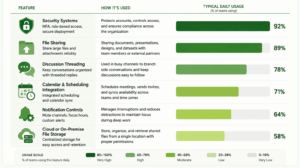
Beyond the vendor-by-vendor breakdown below, a handful of specific features determine whether a collaboration platform actually holds up under daily enterprise use rather than just looking complete in a sales demo.
Security systems should include enforced multi-factor authentication, role-based access, and, for organizations with strict compliance needs, a deployment model that does not depend entirely on a third party’s own security posture. File sharing needs to handle large attachments reliably rather than silently failing or truncating on bigger files, a gap that still separates consumer-grade messengers from enterprise platforms. Discussion threading keeps a fast-moving channel readable by letting side conversations branch off the main flow instead of burying every reply in one continuous stream.
Calendar and scheduling integration reduces the friction of actually getting a meeting on the calendar in the first place, and matters more the larger the organization gets. Notification controls that let a user mute a channel or set focus hours prevent the always-on nature of chat and video from becoming a productivity drain in its own right. Cloud or on-premise file storage tied to the platform determines how easily shared files can be found later, versus scattered across individual downloads folders. None of these features alone justifies a platform choice, but a platform missing several of them tends to generate workarounds that quietly recreate the fragmentation a single collaboration tool was meant to eliminate.
Vendor Analysis
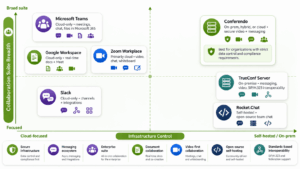
Conferendo
Conferendo is a video conferencing and messaging platform built around on-premise and hybrid deployment, giving organizations the option to run their communication layer entirely on infrastructure they control rather than a shared vendor cloud. Conferendo Server installs directly on an organization’s network, including fully air-gapped environments with no internet dependency, which distinguishes it from every cloud-first platform in this comparison.
Deployment model: On-premise (Conferendo Server), hybrid, and cloud (Conferendo Online) options are all available, letting an organization choose the model that matches its compliance posture rather than being locked into a single architecture.
Collaboration features: Conferendo combines video conferencing, group chat, channels, and file sharing in one platform, with SIP and H.323 interoperability for legacy conference room hardware and multipoint conferencing at scale, though it does not include the document co-editing or project tracking features that broader suites bundle in.
Security and compliance: Conferendo integrates with an organization’s existing Active Directory or LDAP for authentication, supports end-to-end encryption, and, because on-premise deployment keeps session data inside the customer’s own network, avoids the third-party data residency questions every cloud vendor in this comparison has to answer contractually rather than architecturally.
Best for: Government agencies, defense contractors, and enterprises under strict data residency requirements that need secure video and messaging on infrastructure they fully control.
Slack
Slack is a channel-based team messaging platform with one of the most mature third-party integration ecosystems in enterprise collaboration, which is a large part of why it remains a default choice for organizations that want their communication tool to connect to nearly everything else they run.
Deployment model: Cloud only, with Slack positioning its Enterprise Grid tier around large-scale governance rather than infrastructure control.
Collaboration features: Channels, threads, and huddles (Slack’s lightweight audio and video calling) organize conversation by topic rather than by individual, and the integration catalog lets teams surface updates from project management, CRM, and development tools directly inside chat.
Security and compliance: Slack supports SSO, SCIM provisioning, and enterprise-tier data loss prevention through partner integrations, along with retention and export controls for compliance review, though DLP-specific enforcement generally depends on a connected third-party tool rather than native capability.
Best for: Organizations whose core collaboration need is asynchronous, topic-organized team messaging tightly integrated with a broad existing software stack.
Microsoft Teams
Microsoft Teams ties video conferencing, chat, and file collaboration directly into Microsoft 365, extending the same governance boundary that already covers a Microsoft 365 tenant’s email and documents into meetings and messages.
Deployment model: Cloud only for the mainstream product, with data residency options available across Microsoft’s global cloud regions but no fully on-premise deployment path for Teams itself.
Collaboration features: Teams combines chat, video meetings, and file collaboration through OneDrive and SharePoint integration in one interface, and Copilot generates meeting notes and action items directly inside the platform.
Security and compliance: Teams inherits Microsoft 365’s compliance certifications, including HIPAA support with a signed BAA and FedRAMP High for government tenants, plus native integration with Microsoft Purview for data loss prevention and eDiscovery.
Best for: Organizations already standardized on Microsoft 365 that want communication, meetings, and document collaboration governed under one compliance framework.
Google Workspace
Google Workspace centers online collaboration around real-time document editing, with Docs, Sheets, and Slides letting multiple people work in the same file simultaneously, tied to Meet for video and Drive for storage.
Deployment model: Cloud only, with no on-premise deployment option, reflecting Google’s broader cloud-first product philosophy.
Collaboration features: Simultaneous multi-user editing with visible cursors and inline comments is Workspace’s core strength, and Google Meet provides adequate video conferencing for organizations whose primary collaboration need is document-centric rather than meeting-centric.
Security and compliance: Google Workspace is FERPA and HIPAA compliant with appropriate configuration, supports admin-level sharing controls, and Google does not use core Workspace service data for advertising.
Best for: Organizations whose collaboration work is primarily document-centric, where real-time co-editing matters more than deep meeting or messaging features.
Zoom Workplace
Zoom Workplace extends Zoom’s video conferencing base into a broader collaboration product, adding team chat, whiteboarding, and scheduling around the video core that built the company’s reputation.
Deployment model: Primarily cloud, with a limited on-premise option (Zoom Meeting Connector) for organizations needing to keep media traffic local while still depending on Zoom’s cloud for scheduling and account management.
Collaboration features: Zoom’s AI Companion generates meeting summaries and highlights, and the platform’s broad device compatibility and third-party app marketplace remain its strongest differentiators over newer entrants into the collaboration suite category.
Security and compliance: Zoom holds SOC 2 Type II reporting and offers HIPAA compliant configurations and a FedRAMP authorized tier for government customers, though the base and most business tiers route account and metadata through Zoom’s cloud regardless of the encryption mode selected for a given call.
Best for: Organizations prioritizing broad device support and a large third-party integration catalog, expanding from video into chat and whiteboarding without a strict on-premise requirement.
Rocket.Chat
Rocket.Chat is an open-source team chat platform available in both community and enterprise editions, with self-hosted deployment supported across both, giving organizations a lower cost entry point into on-premise messaging than most commercial alternatives.
Deployment model: Self-hosted, with the enterprise edition adding governance features on top of the open-source core, though achieving a fully closed deployment requires deliberate configuration to disable default connections to Rocket.Chat’s cloud services.
Collaboration features: Channels, direct messaging, and basic video calling cover the core communication use case, with an open codebase that lets a security team audit behavior directly rather than relying on vendor documentation alone.
Security and compliance: Rocket.Chat supports LDAP and SAML based authentication, audit logging, and data retention policies on its enterprise tier, and its open-source nature allows independent code review.
Best for: Organizations wanting an open-source foundation for self-hosted team chat with the flexibility to configure toward stronger data control, particularly where budget favors an open-source starting point over a fully commercial suite.
TrueConf Server
TrueConf Server is an on-premise video conferencing and team messaging platform for organizations that want their communication infrastructure to remain under their own administrative control. It combines messaging, video meetings, file exchange, presence, and interoperability with existing standards-based communication systems.
Deployment model: TrueConf Server runs on organization-controlled infrastructure and can operate inside a corporate network. The commercial version can support communication without a permanent internet connection, which makes the platform relevant to private and restricted network scenarios.
Collaboration features: The platform combines team messaging, file exchange, video conferencing, screen sharing, browser participation, desktop and mobile applications, and room system support. A built-in SIP/H.323/RTSP gateway connects TrueConf Server with PBXs, standards-based video endpoints, MCUs, and other communication infrastructure.
Security and compliance: TrueConf Server supports LDAP and LDAPS directory integration, including Microsoft Active Directory, as well as enterprise authentication options. Because the platform is deployed inside the organization’s own environment, administrators can control network access, user data storage, and communication infrastructure directly.
Best for: Enterprises and public sector organizations that need locally controlled messaging and video conferencing with corporate directory integration and SIP/H.323 interoperability.
Pros and Cons at a Glance
Reading seven full vendor breakdowns takes time a busy buyer does not always have. This condensed view surfaces the single biggest strength and the single biggest trade-off for each platform.
|
Platform |
Biggest Strength |
Main Trade-off |
|---|---|---|
|
Conferendo |
Full on-premise and air-gapped deployment with no cloud dependency |
No document co-editing or project tracking bundled in |
|
Slack |
Deepest third-party integration ecosystem in this comparison |
No on-premise option and only lightweight native video (huddles) |
|
Microsoft Teams |
Native governance under an existing Microsoft 365 compliance boundary |
No on-premise deployment path for the platform itself |
|
Google Workspace |
Strongest real-time document co-editing in this comparison |
Video and messaging are secondary to the document-centric core product |
|
Zoom Workplace |
Broadest device compatibility and third-party app marketplace |
Most tiers route metadata through Zoom’s cloud regardless of encryption mode |
|
Rocket.Chat |
Auditable open-source code at a lower cost entry point |
Native video and third-party ecosystem are both limited |
|
TrueConf Server |
Local messaging and video with SIP/H.323 interoperability |
Requires customer-managed server and network infrastructure |
On-Premise Deployment and Data Control Considerations
Most organizations never need an on-premise collaboration layer, because a cloud vendor’s contractual compliance commitments satisfy their requirements. But for the subset of organizations that do need it, the distinction changes the entire evaluation.
On-premise deployment removes the data residency question rather than negotiating it favorably. When Conferendo Server runs entirely inside an organization’s own network, there is no cross-border data transfer or third-party subprocessor list to evaluate in the first place, which is structurally different from Slack, Microsoft Teams, Google Workspace, and Zoom Workplace, all of which answer data residency through contractual commitments and regional data centers rather than by keeping data off their infrastructure entirely.
This distinction matters most for government agencies, defense contractors, and enterprises operating under data residency requirements stricter than standard commercial compliance frameworks address. For a typical organization collaborating internally and externally without a specific regulatory driver, the cloud platforms covered above are sufficient, and adding an on-premise layer would introduce infrastructure overhead without a compliance gap that actually needs closing.
Feature Comparison Table
|
Feature |
Conferendo |
Slack |
Microsoft Teams |
Google Workspace |
Zoom Workplace |
Rocket.Chat |
TrueConf Server |
|---|---|---|---|---|---|---|---|
|
On-premise deployment |
Yes |
No |
No |
No |
Limited |
Yes |
Yes |
|
Native video conferencing |
Yes (core product) |
Limited (huddles) |
Yes |
Yes (Meet) |
Yes (core product) |
Limited |
Yes |
|
Document co-editing |
No |
No |
Yes (via Office) |
Yes (core strength) |
No |
No |
No |
|
Third-party app ecosystem |
Limited |
Extensive |
Extensive |
Extensive |
Extensive |
Limited |
Limited |
|
SIP/H.323 hardware interoperability |
Yes |
No |
Limited |
No |
Yes |
No |
Yes |
|
Directory integration (AD/LDAP) |
Yes |
Yes |
Native |
Yes |
Yes |
Yes |
Yes |
|
Open-source |
No |
No |
No |
No |
No |
Yes |
No |
Security and Compliance Table
|
Platform |
SOC 2 |
HIPAA support |
On-premise / air-gapped option |
Directory integration |
Data stays on customer infrastructure |
|---|---|---|---|---|---|
|
Conferendo |
Vendor dependent audit |
Yes (on-premise) |
Yes |
Yes |
Yes (on-premise deployment) |
|
Slack |
Yes |
No |
No |
Yes |
No |
|
Microsoft Teams |
Yes |
Yes |
No |
Native |
No |
|
Google Workspace |
Yes |
Yes |
No |
Yes |
No |
|
Zoom Workplace |
Yes |
Yes |
Limited |
Yes |
No |
|
Rocket.Chat |
Not applicable (self-hosted) |
Configuration dependent |
Yes |
Yes |
Yes (self-hosted) |
|
TrueConf Server |
Not stated |
Deployment dependent |
Yes |
Yes |
Yes (on-premise) |
AI Features in Online Collaboration Tools
Most platforms in this comparison have added generative AI features over recent product cycles, and the practical value varies by product. Zoom Workplace’s AI Companion and Microsoft Teams’ Copilot both generate meeting summaries, transcripts, and suggested action items directly inside the platform, which primarily saves time on note-taking rather than changing what the meeting itself covers. Slack layers AI-generated channel summaries and search on top of its existing messaging core, aimed at helping someone catch up on a busy channel without reading every message.
Conferendo’s AI-related capability sits in a different category, focused on the video infrastructure layer through optional integration with a dedicated transcription service rather than a bundled meeting assistant, which matters more to an IT administrator managing an on-premise deployment than to an individual user looking for a quick summary. None of these AI additions replace the underlying platform choice; they are a layer on top of it, and a platform with a weak core communication experience does not become a strong choice because it added an AI summary feature.
Benefits of Online Collaboration
Reduced dependence on email is the most immediately noticeable shift for teams adopting a dedicated collaboration platform, since real-time chat and video move the fastest-moving conversations out of an inbox that was never designed for rapid back and forth. Improved productivity follows from the same shift: decisions that would take a multi-day email thread to resolve often close within a single chat exchange or a short video call, and asynchronous tools let people in different time zones contribute without waiting for a synchronous meeting slot.
Reduced travel and office overhead costs are the most directly quantifiable benefit for distributed organizations, replacing in-person meetings with video calls at a fraction of the cost of flying people between offices. Beyond cost, collaboration tools that log decisions and file sharing history create a documentation trail that a purely verbal or in-person process never generates, which matters for both operational continuity and, in regulated industries, compliance evidence.
Tips for More Effective Online Collaboration
Choosing the right platform solves half the problem. How a team actually uses it determines whether collaboration improves or just moves the same friction into a new tool.
- Agree on which channel is for what before rolling out a new tool, so urgent questions go to chat, detailed decisions go to a document, and routine updates go to a scheduled meeting rather than everything landing in one undifferentiated stream.
- Default to asynchronous communication for anything that does not require an immediate reply, reserving synchronous meetings for discussions that genuinely need real-time back and forth.
- Set explicit norms for response time expectations by channel, since an unstated assumption that every message needs an instant reply is what drives the notification overload described below.
- Keep meeting recordings and chat history organized and searchable rather than scattered, so the documentation benefit of online collaboration is actually retrievable later rather than theoretical.
- Review which tools are actually being used every quarter, retiring redundant ones before tool sprawl becomes an entrenched administrative cost.
- Train new hires on the specific collaboration norms of their team during onboarding, rather than assuming familiarity with a tool translates into familiarity with how the organization actually uses it.
Common Challenges in Online Collaboration Adoption
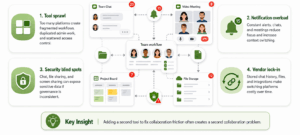
Tool sprawl is the most consistent operational problem across organizations adopting multiple collaboration platforms: a company running Slack for internal chat, Zoom Workplace for external video calls, and Google Workspace for documents has three separate vendor relationships, three separate security reviews, and three separate places where a former employee’s access needs to be revoked, which is precisely the fragmentation that suite platforms like Microsoft Teams are built to reduce.
Notification overload is a close second, where employees juggling multiple always-on collaboration tools report feeling less productive rather than more, since constant context switching between channels, chats, and video calls fragments deep work rather than enabling it. Security blind spots emerge specifically around collaboration tools because organizations frequently apply strong data loss prevention and access control to email and file servers while treating chat and video as lower risk, even though a file shared in a group chat or a screen shared during a video call moves the same sensitive data an email attachment would.
Vendor lock-in through accumulated chat history, files, and integration configuration makes switching platforms expensive years into a deployment, which is a specific reason organizations with a genuine data control requirement should weigh Conferendo’s on-premise model early, since the cost of migrating away from a cloud vendor’s proprietary storage format only grows over time.
How to Choose an Online Collaboration Platform?
Start by identifying which collaboration mode is actually broken, synchronous meetings and conversation, or asynchronous document work and file sharing, since a platform strong at one is not automatically strong at the other, and buying a suite to fix a narrow problem often adds administrative overhead without solving it. Confirm deployment model matches actual data control requirements before evaluating feature depth, since a feature-rich cloud platform that fails a hard compliance requirement is not a viable shortlist candidate regardless of how well it scores elsewhere.
Verify directory and identity integration works against the organization’s existing authentication system rather than requiring a parallel identity model, and confirm the platform’s third-party integration ecosystem actually covers the specific tools the organization already runs, not a generic list of theoretical integrations. Finally, pilot the platform with one team for a defined period before a full rollout, specifically testing whether it holds up under the organization’s real meeting sizes, file volumes, and network conditions rather than a small controlled demo.
FAQ
What is the difference between online collaboration and remote work software?
Online collaboration refers specifically to tools that let people work together on shared tasks, whether through chat, video, or document editing, while remote work software is a broader category that also includes tools with no collaborative function, like personal time tracking. Conferendo falls into the collaboration category specifically because it centers on live, shared communication between multiple people rather than individual productivity tracking.
Is a cloud collaboration platform secure enough for regulated industries?
It depends heavily on the specific platform and deployment model rather than the category as a whole. Cloud platforms like Microsoft Teams, Google Workspace, and Zoom Workplace offer strong compliance certifications at their enterprise tiers, while Conferendo’s on-premise deployment option removes the third-party data residency question entirely for organizations whose regulatory requirements go beyond what a standard cloud certification can satisfy.
Can an online collaboration platform work without internet access?
Most platforms in this category, including Slack, Microsoft Teams, and Google Workspace, require an internet connection since they are architected as cloud services. Conferendo is the clear exception among the vendors compared here, since Conferendo Server supports fully autonomous operation on an air-gapped network with no internet dependency at all.
Should a company use one all-in-one collaboration suite or several specialized tools?
This depends on the organization’s tolerance for administrative complexity versus its need for best-in-class features in each category. A suite like Microsoft Teams or Google Workspace reduces the number of vendor relationships and security reviews an IT team manages, while a specialized stack combining Conferendo for secure video with dedicated document and project tools can outperform a suite in each individual category at the cost of more integration and administrative work.
What should IT leaders prioritize when evaluating online collaboration platforms?
Deployment model and data control requirements should be assessed before feature comparison, since a platform that fails a hard compliance requirement is disqualified regardless of its feature depth. For organizations with a strict data residency requirement, Conferendo’s on-premise option gets evaluated alongside cloud platforms like Slack and Microsoft Teams rather than dismissed on convenience grounds alone.
Does Conferendo support document co-editing like Google Workspace or Microsoft Teams?
No, Conferendo is architected as video conferencing and messaging infrastructure rather than a full productivity suite, so it does not include the real-time document co-editing that Google Workspace and Microsoft Teams provide through their respective office application integrations. Organizations needing both typically deploy Conferendo for the secure communication layer and pair it with a dedicated document collaboration tool.
How much does an online collaboration platform typically cost?
Pricing varies by category and deployment model: cloud suites like Microsoft Teams, Google Workspace, and Slack price per user per month, while Conferendo’s on-premise licensing is typically quoted based on user count and infrastructure scale rather than a fixed public per-seat rate. Organizations should request quotes based on their actual deployment model rather than comparing list prices across platforms that are not directly comparable.
Do AI features change which online collaboration platform a company should choose?
Not on their own. AI meeting summaries and smart search, offered by Zoom Workplace, Microsoft Teams, and Slack, save time on note-taking but sit on top of the underlying platform rather than replacing the deployment and security questions that should drive the actual decision. Conferendo’s AI-related capability is scoped to the video infrastructure layer through optional transcription integration, which matters more for organizations already choosing it for on-premise deployment than as a standalone reason to pick a platform.