

Unified communications, or UC, is an approach that combines business calling, messaging, video meetings, presence, conferencing, and other communication tools into a coordinated environment. Instead of treating the phone system, messenger, meeting platform, and directory as separate products, UC connects them so employees can move between channels while keeping the same identity, contacts, policies, and communication context.
Unified communications is most useful for organizations that need to connect office staff, remote employees, branches, meeting rooms, mobile workers, and external participants. The main differences between UC platforms include telephony architecture, PSTN connectivity, deployment model, directory integration, interoperability, administration, data location, and the ability to operate without public cloud dependencies.
|
UC requirement |
What it means? |
Typical technology |
|---|---|---|
|
Business calling |
Internal and external voice calls |
PBX, VoIP, PSTN connectivity |
|
Team messaging |
Direct and group conversations |
Persistent chat, channels, threads |
|
Video collaboration |
Meetings and visual collaboration |
Video conferencing, screen sharing, rooms |
|
Presence |
Information about user availability |
Online, busy, in meeting, do not disturb |
|
Identity |
One corporate account across services |
SSO, LDAP, Active Directory |
|
Device support |
Communication from different endpoints |
Desktop, mobile, desk phone, room system |
|
External communication |
Calls and meetings outside the company |
PSTN, guest access, SIP |
|
Administration |
Central control over users and policies |
Admin console, roles, analytics |
|
Integration |
Connection with business systems |
CRM, calendar, APIs, contact center |
|
Deployment |
Where the communication system runs |
Cloud, private cloud, on-premises, hybrid |
What Is Unified Communications?

Unified communications is the integration of multiple business communication channels into a coordinated system.
A typical UC environment can include:
- business telephony;
- instant messaging;
- group chats and channels;
- voice and video meetings;
- presence information;
- corporate directories;
- voicemail;
- meeting rooms;
- file sharing;
- calendars;
- call routing;
- mobile communication;
- APIs and business application integrations.
The core idea is not simply to place many tools inside one application. A true UC architecture also connects user identity, calling, routing, directories, endpoint management, policies, and communication workflows.
For example, an employee may find a colleague in the corporate directory, check presence, send a message, escalate the conversation to a voice call, start a video meeting, and then continue the discussion from a mobile device.
Unified Communications vs UCaaS vs Collaboration
The terms UC, UCaaS, and collaboration are related, but they are not interchangeable.
|
Term |
Meaning |
Main distinction |
|---|---|---|
|
Unified communications |
Integrated voice, messaging, video, presence, and related services |
Describes the communication architecture |
|
UCaaS |
Unified communications delivered as a cloud service |
Describes a delivery model |
|
Collaboration platform |
Communication plus documents, whiteboards, tasks, workflows, and content |
Broader focus on teamwork |
|
Business phone system |
Calling, numbers, extensions, queues, voicemail |
Primarily telephony |
|
Contact center |
Customer service interactions, routing, agents, analytics |
Focused on external customer communication |
|
CPaaS |
APIs for embedding voice, messaging, video, or authentication |
Developer-focused communication building blocks |
A cloud service can be UCaaS, but unified communications does not have to run in a public cloud. UC can also be deployed on-premises, in a private cloud, or through a hybrid architecture.
Benefits of Unified Communications

The main benefit of UC is not simply having more communication features. The value comes from coordinating people, devices, channels, and administration around one communication environment.
Key benefits include:
- Simpler administration. IT teams can manage identities, policies, devices, and communication services more centrally.
- Consistent corporate identity. Employees can use the same account, directory, and business identity across different communication modes.
- Better support for remote work. Staff can access business communication tools from desktops, mobile devices, and remote locations.
- Lower tool duplication. UC can replace overlapping messaging, meeting, telephony, and conferencing products.
- Better interoperability. Enterprise UC platforms may connect software users with PBXs, room systems, carriers, and existing communication infrastructure.
- More predictable governance. Centralized policies make it easier to control access, external participants, recordings, retention, and communication data.
The value becomes especially visible in large organizations where employee onboarding, phone number assignment, branch migration, or account termination would otherwise require updates across several independent systems.
Unified Communications Market Statistics
Market research continues to show strong investment in integrated enterprise communications.
Fortune Business Insights estimated the global unified communication market at about USD 191.8 billion in 2025 and projected growth to about USD 227.7 billion in 2026. The same research estimated video communication at roughly 30% of the market and telephony at about 25%.
A narrower UC and collaboration market definition produced a smaller estimate, while research focused specifically on UCaaS produced a different figure again. This difference reflects the fact that analysts do not always include the same combination of telephony, conferencing, collaboration software, infrastructure, and cloud services.
Core Components of a Unified Communications System
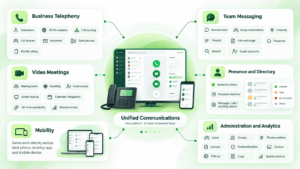
Business Telephony
Voice remains one of the defining elements of UC.
A business telephony layer can include:
- extensions;
- PSTN numbers;
- internal dialing;
- call forwarding;
- call queues;
- auto attendants;
- voicemail;
- recording;
- call routing;
- desk phone support;
- mobile calling.
Modern platforms vary significantly in how they provide external calling. Some operate their own cloud telephony service, some work through certified carriers, and others connect to an existing PBX or Session Border Controller.
Team Messaging
Persistent messaging replaces many short email exchanges and creates shared spaces for teams and projects.
Useful enterprise functions can include:
- personal chats;
- group conversations;
- channels;
- threads;
- file exchange;
- presence;
- message search;
- guest accounts;
- retention policies.
Video Meetings
Video is another central UC workload.
Enterprise requirements extend beyond basic webcam meetings. Organizations may need meeting rooms, webinar modes, recording, guest access, screen sharing, calendar integration, room endpoints, SIP interoperability, and centralized meeting policies.
Presence and Directory
Presence shows whether a user is available, offline, busy, or already in a call.
When presence is connected to the corporate directory, users can decide whether to message, call, or schedule a meeting before starting another communication attempt.
Mobility
A UC platform should allow employees to maintain their work identity across different devices.
A user may answer a business call on a desk phone, continue from a desktop application, or communicate through a mobile device while keeping the same corporate account.
Administration and Analytics
For IT teams, unified administration may be as important as the user interface.
Administrators typically need to manage:
- users;
- groups;
- phone numbers;
- call routing;
- licenses;
- authentication;
- devices;
- meeting policies;
- guest access;
- recordings;
- logs;
- quality metrics.
How Does Unified Communications Work?
UC platforms connect several communication layers around a common identity and routing model.
A simplified interaction looks like this:
- Identity verifies the user. The employee signs in through a corporate directory or SSO service.
- Presence shows availability. Other employees can see whether the user can communicate.
- Messaging handles asynchronous communication. Employees exchange text, files, and project information.
- Calling handles real-time voice. Internal calls remain within the UC environment, while external calls connect to the PSTN.
- Video handles richer collaboration. A chat or call can become a video meeting.
- Administration applies policies. IT controls access, routing, devices, and communication settings centrally.
The exact architecture differs by platform. A cloud UC provider may host most components. An on-premises platform can keep core services inside the organization’s infrastructure. Hybrid models divide responsibilities between local systems, cloud services, and carriers.
Cloud, On-Premises, and Hybrid Unified Communications
Deployment is one of the most important UC decisions because it affects administration, telephony, compliance, resilience, and control.
|
Model |
Infrastructure location |
Main advantage |
Main tradeoff |
|---|---|---|---|
|
Public cloud UCaaS |
Provider infrastructure |
Fast deployment and provider-managed operations |
Greater dependency on provider infrastructure |
|
Private cloud |
Dedicated hosted environment |
More isolation and configuration control |
Infrastructure may still be externally operated |
|
On-premises UC |
Organizational infrastructure |
Direct control over servers and communication data |
Requires internal administration |
|
Hybrid UC |
Combination of local and cloud components |
Gradual migration and support for existing systems |
More architectural complexity |
|
Isolated network |
Organizational infrastructure without required internet connectivity |
Maximum autonomy |
Requires careful infrastructure planning |
Resilience and Survivability
Resilience matters when communication must continue during WAN, cloud, or carrier outages. A branch may need to preserve internal calling, local device communication, or selected services even when access to a central cloud platform is interrupted.
Cloud-first and locally controlled UC architectures can behave very differently during network failure. Buyers should check failover, local survivability, redundant routing, backup connectivity, and how authentication behaves when external services are unavailable.
Security and Governance in Unified Communications
UC centralizes sensitive business conversations, so governance should be evaluated before selecting a platform.
Important questions include:
- Where are messages, recordings, and call data stored?
- Who can create users and communication spaces?
- How quickly can access be revoked?
- Can administrators control external users?
- What audit logs are available?
- How are recordings retained?
- Does the platform depend on external cloud services?
- Can communication policies differ between departments?
- Can the system integrate with DLP, SIEM, or identity infrastructure?
Identity governance is especially important. A UC account may provide access not only to chat, but also to calling, meeting rooms, files, recordings, directories, and external communication.
Centralization can improve control because fewer systems require separate policies. It can also concentrate sensitive communication in one environment, which makes administrative permissions, retention policies, authentication, logging, and infrastructure design more important.
Leading Unified Communications Platforms

The following platforms represent different communication strategies. The list is not a ranking. Some focus on enterprise telephony, some on cloud collaboration, some on infrastructure control, and others on video-first communication.
Microsoft Teams and Teams Phone
Microsoft Teams combines messaging, meetings, collaboration, and business calling within the Microsoft 365 environment.
Teams Phone adds enterprise telephony features and PSTN access. Microsoft supports several PSTN models, including Microsoft Calling Plans, Operator Connect, Teams Phone Mobile, and Direct Routing. Organizations can combine different connectivity models when regional or carrier requirements vary.
Direct Routing allows an organization to connect Teams to a chosen telecom provider through a certified Session Border Controller. This is useful for companies that already operate regional carriers, SBC infrastructure, or complex voice routing.
Best for: organizations already standardized on Microsoft 365.
Strengths: messaging, meetings, Microsoft 365 integration, several PSTN models, Direct Routing, Operator Connect, broad device ecosystem.
Limitations: telephony architecture can become complex when Microsoft licensing, carriers, SBCs, and regional calling requirements are combined.
Cisco Webex
Webex Suite combines calling, meetings, messaging, webinars, events, polling, whiteboarding, and video messaging. Cisco manages collaboration workloads through a common environment and Control Hub.
Webex Calling provides cloud business telephony with voicemail, routing, desktop and mobile access, and Cisco IP phone support. Cisco also maintains enterprise communication infrastructure such as Cisco Unified Communications Manager, which remains relevant for companies with existing Cisco calling and room deployments.
Best for: enterprises with extensive Cisco voice, meeting room, networking, or collaboration environments.
Strengths: enterprise calling, meetings, messaging, devices, webinars, whiteboarding, centralized administration, AI functions.
Limitations: the Cisco collaboration portfolio is broad, so organizations should map architecture and licensing carefully when cloud services and existing infrastructure are combined.
Zoom Workplace
Zoom Workplace represents a meeting-first path into unified communications. It expands the familiar Zoom meeting environment into persistent messaging, business telephony, scheduling, documents, whiteboards, tasks, and AI-assisted workflows.
Zoom Phone adds cloud business telephony with centralized administration for users, numbers, and policies. Meeting conversations can continue in persistent chat, which helps connect synchronous meetings with ongoing team communication.
Zoom Phone also supports calling, SMS, voicemail, fax, call summaries, voicemail processing, and AI-assisted receptionist scenarios.
Best for: organizations that want to extend a meeting-centric environment into cloud calling, messaging, and productivity workflows.
Strengths: video meetings, team chat, cloud telephony, AI assistance, whiteboards, scheduling, documents, tasks.
Limitations: organizations with extensive legacy PBX, local infrastructure, or isolated network requirements need to assess cloud dependency and telephony migration carefully.
Conferendo
Conferendo represents a video-first communication approach rather than a telephony first UC architecture. Its public product focuses on video calls, group conferencing, chat, and communication across desktop, mobile, and browser-based clients.
This makes Conferendo more relevant when video communication and direct user interaction are the primary requirements. It can support lightweight collaboration scenarios without requiring an organization to adopt a full PBX replacement, carrier integration, or complex enterprise telephony stack.
Conferendo should therefore be evaluated differently from platforms such as Microsoft Teams Phone, RingCentral, or TrueConf. Those platforms cover broader UC scenarios, including enterprise calling, interoperability, corporate directories, and integration with existing communication infrastructure.
Best for: teams and organizations that prioritize video calls, group meetings, chat, and straightforward user communication.
Strengths: video-first communication, group conferencing, chat, cross-device access, and lightweight collaboration.
Limitations: Conferendo is not positioned primarily as a replacement for complex enterprise PBX infrastructure. Organizations that require PSTN routing, SBCs, large telephony environments, or deep voice infrastructure integration should assess those requirements separately.
RingCentral RingEX
RingEX represents a phone-first cloud UC approach. Business telephony is the core layer, with messaging, video meetings, SMS, fax, analytics, devices, and application integrations built around it.
The platform includes phone administration, call handling and call forwarding, voicemail, call recording, audio conferencing, messaging, fax, texting, video meetings, analytics, and developer tools.
RingCentral also provides a broad integration layer for CRM, productivity, support, and other business applications, alongside AI functions for call notes, transcription, message translation, and writing assistance.
Best for: organizations that want cloud telephony as the primary communication layer with messaging, video, and business integrations around it.
Strengths: telephony, SMS, messaging, video, integrations, analytics, AI communication features.
Limitations: organizations whose main requirement is full control of local communication infrastructure may prefer a platform designed around on-premises deployment.
8×8 Work
8×8 Work is a cloud unified communications platform combining business phone, video meetings, messaging, and collaboration.
The platform also includes call recording, voicemail transcription, browser calling, mobile and desktop applications, public and private messaging spaces, call queues, auto attendants, and administration tools.
A major differentiator is the connection between UC and customer communication. 8×8 combines employee communication with contact center, customer engagement, and communications API products.
8×8 also provides Microsoft Teams telephony options through Direct Routing and Operator Connect scenarios.
Best for: organizations that want cloud UC and customer communication services from the same vendor.
Strengths: voice, meetings, messaging, global telephony, contact center integration, APIs, Microsoft Teams telephony options.
Limitations: the portfolio extends beyond core UC, so buyers should separate employee communication requirements from contact center and customer engagement requirements during evaluation.
TrueConf Server
TrueConf Server takes a locally controlled approach to unified communications. The platform is deployed on organization-managed infrastructure and combines video conferencing, team messaging, presence, file exchange, administration, and interoperability with existing communication systems.
A built-in SIP/H.323/RTSP gateway allows TrueConf Server to connect with PBXs, SIP and H.323 endpoints, MCUs, IP cameras, and other standards-based infrastructure. Users can also call VoIP subscribers and external phone numbers when the required SIP or PBX integration is configured.
TrueConf Server supports LDAP and Active Directory integration, SSO, desktop and mobile applications, browser participation, room systems, and conferences with up to 2,000 participants. The platform can operate inside a corporate network, which is relevant when communication infrastructure needs to remain under organizational control.
Best for: enterprises and public-sector organizations that want messaging, video conferencing, directory integration, and interoperability with existing communication infrastructure in a locally deployed UC environment.
Strengths: on-premises deployment, private network operation, team messaging, video conferencing, LDAP and Active Directory integration, SIP/H.323 interoperability, room system support.
Limitations: organizations are responsible for the supporting server and network infrastructure, while PSTN calling depends on integration with an appropriate PBX, SIP provider, or telephony environment.
Unified Communications Platform Comparison
|
Platform |
Core model |
Business telephony |
Messaging |
Video |
Deployment |
Distinctive capability |
|---|---|---|---|---|---|---|
|
Microsoft Teams |
Cloud collaboration with telephony options |
Yes |
Yes |
Yes |
Cloud with hybrid voice options |
Multiple PSTN connectivity models |
|
Cisco Webex |
Cloud collaboration and enterprise calling |
Yes |
Yes |
Yes |
Cloud with enterprise infrastructure options |
Broad calling and device ecosystem |
|
Zoom Workplace |
Meeting-first cloud UC |
Yes |
Yes |
Yes |
Cloud |
Meetings extended into messaging, calling, and productivity |
|
Conferendo |
Video-first communication |
Not a primary focus |
Yes |
Yes |
Hosted communication service |
Video calls, conferencing, chat, and lightweight collaboration |
|
RingCentral RingEX |
Phone-first cloud UCaaS |
Yes |
Yes |
Yes |
Cloud |
Telephony plus broad application integration |
|
8×8 Work |
Cloud-based UC and CX |
Yes |
Yes |
Yes |
Cloud |
UC, contact center, and communications APIs |
|
TrueConf Server |
Locally deployed unified communications |
Via SIP/PBX integration |
Yes |
Yes |
On-premises and private infrastructure |
Private network operation and SIP/H.323 interoperability |
How to Choose a Unified Communications Platform?
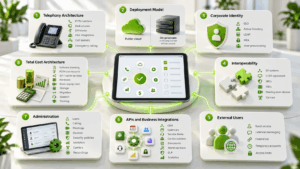
The best UC platform depends on infrastructure and communication requirements, not simply the number of features.
Telephony Architecture
Start with voice.
Determine whether the organization needs:
- PSTN numbers;
- existing carrier contracts;
- desk phones;
- call queues;
- emergency calling;
- branch survivability;
- SIP trunks;
- PBX integration;
- call recording;
- regional routing.
A company with complex telephony requirements may make a different UC choice from a company that primarily needs video meetings and messaging.
Deployment Model
Decide whether communications can run entirely in a public cloud or whether some services must remain in company-owned infrastructure.
This is especially important for government, healthcare, finance, industrial networks, and other environments with strict infrastructure requirements.
Corporate Identity
Check support for the organization’s identity model.
Important options can include:
- SSO;
- Active Directory;
- LDAP;
- automated user provisioning;
- multi factor authentication;
- centralized account deactivation.
Interoperability
Existing communication infrastructure rarely disappears immediately.
Check whether the new UC platform can work with:
- SIP systems;
- H.323 equipment;
- SBCs;
- PBXs;
- meeting room devices;
- desk phones;
- existing carriers;
- contact centers.
External Users
Partners, customers, contractors, and guests often need controlled access.
Evaluate guest meeting links, external messaging, federation, temporary accounts, and policies that limit what external participants can see.
APIs and Business Integrations
UC should fit into the wider application environment.
Common integration targets include CRM, calendars, service desks, contact centers, document systems, workflow tools, DLP, analytics, and internal applications.
Administration
A unified user experience does not automatically mean unified administration.
IT teams should verify how many consoles are required for:
- users;
- calling;
- meetings;
- devices;
- security policies;
- analytics;
- carriers;
- recordings.
Total Cost Architecture
UC cost should be evaluated beyond the software subscription or server license.
A realistic cost model can include:
- software licensing;
- PSTN connectivity;
- SIP trunks or carrier services;
- SBCs;
- desk phones and headsets;
- meeting room equipment;
- recording storage;
- migration work;
- integrations;
- support;
- administrator time;
- training.
A platform with a lower license price can still be more expensive if it requires additional carrier services, hardware, migration tools, or administration.
Unified Communications and Contact Centers
UC and contact center software solve related but different problems.
Unified communications primarily connects employees. Contact center platforms manage structured customer interactions through queues, routing, agents, supervisors, workforce management, and customer analytics.
The two environments increasingly overlap. A company may use one vendor for employee communications and customer service, or integrate separate systems so agents can involve specialists from other departments without losing communication context.
The practical benefit is context transfer. A customer interaction can begin with an agent and then involve another employee without forcing the company to manage completely independent communication environments.
Common Unified Communications Mistakes
Ignoring the PSTN layer. External calling involves carriers, numbers, emergency services, regulations, and routing. These requirements should be mapped before changing phone systems.
Assuming every local deployment is autonomous. A locally installed server may still depend on licensing, identity, notification, or other external services.
Underestimating endpoints. Desk phones, room systems, headsets, mobile devices, gateways, and branch hardware may represent a major part of the migration.
Comparing only license prices. Administration, carrier contracts, hardware, support, migration, storage, training, and integration can significantly affect total cost.
When Does a Business Need Unified Communications?

A UC project becomes particularly relevant when several of these conditions exist:
- employees use multiple messaging and meeting tools;
- the organization operates more than one phone system;
- remote users need corporate calling;
- branches have different communication infrastructure;
- meeting rooms are difficult to connect with software users;
- employee onboarding requires several independent accounts;
- calls, messages, and meetings use separate directories;
- IT manages several communication vendors;
- external collaboration is difficult to control;
- the company is planning to replace a PBX.
The presence of one issue does not necessarily justify a full UC migration. When several occur together, the business case for consolidating communications becomes easier to measure.
Conclusion
Unified communications combines voice, messaging, video, presence, identity, endpoints, and administration into a coordinated business communication environment. UC can be delivered through public cloud services, local infrastructure, private cloud, or hybrid architectures. The right model depends on telephony, security, survivability, interoperability, data control, administration, and migration requirements.
The leading platforms take different approaches. Microsoft Teams emphasizes Microsoft 365 integration and flexible PSTN connectivity, Cisco Webex combines calling with a broad collaboration and device ecosystem, Zoom Workplace follows a meeting-first path into broader UC, RingCentral takes a phone-first cloud approach, 8×8 connects UC with customer communication, and TrueConf emphasizes locally controlled messaging, video conferencing, and interoperability with existing SIP/H.323 infrastructure. Conferendo fits a video-first communication scenario where meetings, calls, chat, and lightweight user interaction matter more than PSTN replacement or complex enterprise telephony.
FAQ
What does unified communications mean?
Unified communications means combining business voice, messaging, video, presence, and related communication services into a coordinated environment. The goal is to give users a common identity, directory, and workflow across different communication channels.
What is the difference between UC and UCaaS?
UC describes the communication architecture, while UCaaS describes cloud delivery of unified communications as a service. A UC platform can also run on-premises or through a hybrid architecture, so not every UC system is UCaaS.
What are the main components of unified communications?
The main components are business calling, messaging, video meetings, presence, corporate directories, mobility, administration, and integrations. Some platforms cover the full UC stack, while others, such as Conferendo, focus more heavily on video communication, conferencing, and chat.
Can unified communications run on-premises?
Yes. Some UC platforms support on-premises or hybrid deployment, while others are delivered primarily as hosted services. If local infrastructure is mandatory, buyers should verify server location, external dependencies, identity requirements, routing, and failover rather than assuming every UC product supports the same deployment model.
Is Conferendo a full enterprise UC platform?
Conferendo is better evaluated as a video-first communication platform than as a direct replacement for a PBX-centric UC system. It is more relevant for video calls, conferencing, chat, and lightweight collaboration, while organizations that require PSTN routing, SBCs, enterprise calling, or deep telephony integration should compare those capabilities separately.
Is Microsoft Teams a unified communications platform?
Microsoft Teams becomes a broader UC environment when collaboration features are combined with Teams Phone and PSTN connectivity. Microsoft supports several external telephony models, including Calling Plans, Operator Connect, Teams Phone Mobile, and Direct Routing.
What is the difference between unified communications and a contact center?
Unified communications primarily connects employees and business teams. A contact center manages structured customer interactions with routing, queues, agents, supervisors, and customer service analytics.