

An HD video call is a video conversation transmitted at a resolution generally associated with 720p or higher. Full HD usually refers to 1080p, while some business video conferencing systems can support 4K video under suitable hardware, network, licensing, and meeting conditions.
For most users, better video quality depends on more than camera resolution. A platform must be able to capture, encode, transmit, receive, decode, and display the video at the required quality. Available bandwidth, processor performance, camera capability, meeting size, layout, and platform settings can all reduce the actual resolution during a call.
For business use, HD video calling is most valuable when visual detail matters, such as customer meetings, product demonstrations, remote training, telemedicine, executive communication, conference rooms, engineering discussions, and hybrid meetings.
HD Video Calling at a Glance
|
Question |
Short answer |
|---|---|
|
What is an HD video call? |
A video call transmitted at 720p or higher resolution |
|
What is Full HD? |
1920 × 1080 pixels, commonly called 1080p |
|
Is 4K better than 1080p? |
It provides more detail, but requires more capable cameras, hardware, displays, and network capacity |
|
Does a 1080p webcam guarantee a 1080p call? |
No. The conferencing platform, subscription, processor, bandwidth, meeting type, and receiving device also matter |
|
How much bandwidth does HD need? |
Requirements vary by platform and scenario. Full HD commonly requires several Mbps per stream |
|
What matters besides resolution? |
Frame rate, bitrate, lighting, camera quality, packet loss, latency, codecs, and audio quality |
|
Is HD important for business meetings? |
Yes when faces, documents, physical objects, demonstrations, or room participants must remain visually clear |
|
Can HD video work on a private company network? |
Yes, if the chosen platform supports deployment on company controlled infrastructure |
What Is an HD Video Call?

An HD video call is a real time video connection in which the video stream is transmitted at high definition resolution.
The two resolutions most often associated with HD calling are:
- 720p, which normally means 1280 × 720 pixels
- 1080p, also called Full HD, which means 1920 × 1080 pixels
Some conferencing platforms and room systems support 4K Ultra HD, normally 3840 × 2160 pixels.
Resolution describes how many pixels make up the image. More pixels can reveal more detail, but resolution alone does not determine perceived quality. A clean 720p stream with good lighting, stable bandwidth, and a high quality camera can look better than an unstable 1080p stream with poor lighting and heavy compression.
This distinction is important when comparing video conferencing platforms. A product page that mentions Full HD does not necessarily mean every participant in every meeting continuously sends and receives 1080p.
720p vs 1080p vs 4K Video Calls
|
Resolution |
Pixel dimensions |
Typical use |
Main consideration |
|---|---|---|---|
|
Standard definition |
Around 640 × 360 |
Low bandwidth calls, small video tiles |
Lower data use, limited facial and object detail |
|
HD |
1280 × 720 |
General business meetings |
Good balance between clarity and network use |
|
Full HD |
1920 × 1080 |
Customer meetings, presentations, larger displays |
Requires more bandwidth and processing power |
|
4K Ultra HD |
3840 × 2160 |
Conference rooms, detailed demonstrations, specialist use |
Requires capable cameras, endpoints, displays, and infrastructure |
For a laptop meeting with several participant tiles, 720p may already be sufficient. Full HD becomes more useful when one speaker fills a large screen, when a physical product must be shown clearly, or when meeting room displays are used.
4K can add detail in professional room environments, but its practical benefit depends heavily on screen size, camera positioning, network conditions, and how the conferencing system handles multiple participants.
What Determines HD Video Call Quality?

A platform cannot create image detail that the camera never captured. At the same time, a high resolution camera cannot force the conferencing service to transmit that resolution.
HD video quality depends on the whole media chain.
Camera
A 1080p call normally requires a camera capable of capturing 1080p video. Image sensor quality, optics, exposure, autofocus, and low light performance also affect the picture.
A good camera at 720p can outperform an inexpensive 1080p webcam in poor conditions.
Network Connection
Video calls continuously adapt to available network capacity. If bandwidth drops or packet loss rises, conferencing software may reduce bitrate, resolution, or frame rate to keep the conversation running.
Microsoft documents Teams video resolutions up to 1920 × 1080 depending on device capability and conditions. The platform can reduce media quality when network capacity is constrained.
Processor and Graphics Hardware
Encoding and decoding Full HD video requires more computing resources than lower resolutions.
Google lists a high performance processor, a 1080p camera, and compatible graphics capability among the requirements that can affect Full HD Meet use.
Frame Rate
Resolution determines image detail. Frame rate determines how frequently the picture updates.
A 1080p stream at 30 frames per second may show more detail than 720p, while 60 frames per second can make motion look smoother. For meetings dominated by talking heads, 30 frames per second is usually sufficient. Higher frame rates become more useful for movement, demonstrations, training, and room environments.
Lighting
Poor lighting increases image noise. Video encoders then have to spend more bitrate describing that noise, which can reduce visible detail elsewhere in the frame.
Good front lighting often improves perceived video quality more than moving from one webcam resolution to the next.
Video Layout
A system may be capable of receiving a Full HD stream but show each participant in a small tile. In that situation, much of the additional resolution is visually unnecessary.
This is why the number of visible participants, active speaker mode, room display size, and layout design matter when evaluating an HD conferencing system.
What Equipment Do You Need for an HD Video Call?
For a reliable HD video call, the basic setup includes a camera that can capture the required resolution, a computer or conferencing endpoint capable of encoding and decoding the stream, a microphone or headset, a display, and a stable network connection.
For 1080p or 4K video, hardware requirements increase. The camera, processor, graphics hardware, conferencing software, display, and receiving endpoint all need to support the target quality. In meeting rooms, organizations may also need dedicated room cameras, speakerphones, microphones, capture devices, and larger displays.
A typical HD video setup includes:
- a 720p or 1080p camera for standard HD meetings;
- sufficient processor and graphics performance for encoding and decoding;
- a microphone, headset, or conference room audio system;
- a display with enough resolution to make HD video useful;
- a stable wired or wireless network connection with sufficient bandwidth;
- conferencing software that supports the required resolution in the selected meeting scenario.
Buying a 4K camera alone does not create a 4K meeting. Every part of the media path must support the target resolution.
How Much Bandwidth Does an HD Video Call Need?

There is no single bandwidth number that applies to every platform. Video codecs, frame rates, layout, meeting size, and adaptive compression all change network use.
Zoom documents approximately 1.2 Mbps in each direction for 720p one to one calls. For 1080p, Zoom lists several Mbps in each direction, with exact requirements depending on the meeting scenario.
Microsoft also documents several Mbps per stream for supported 1080p scenarios and can reduce resolution when the network cannot maintain Full HD.
These figures should be treated as platform specific examples rather than universal rules.
For an organization, network planning should consider simultaneous calls rather than the bandwidth of one user.
If 100 employees participate in HD meetings at the same time, the total traffic requirement can become much more important than the bandwidth needed by a single workstation.
Why HD Video Calls Matter for Business?
High resolution is most valuable when the meeting communicates visual information.
A sales representative may need to show a physical product. A doctor may need a clearer image during a remote consultation. A manufacturer may use video to inspect equipment. A trainer may demonstrate an object or process. An executive may join a conference displayed on a large meeting room screen.
HD also improves the experience of hybrid meetings. Remote participants are easier to distinguish on large displays, and facial expressions can remain clearer when several people share one conference room camera.
However, organizations should not treat maximum resolution as the main measure of conferencing quality.
A stable 720p call with clear audio is usually more useful than a 1080p connection that frequently freezes or loses sound.
HD Video Call Statistics and Market Trends
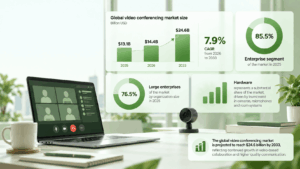
The demand for higher quality business video sits inside a much larger shift toward video based collaboration.
Grand View Research valued the global video conferencing market at $13.1 billion in 2025 and estimates it at $14.4 billion in 2026. The same research projects the market to reach $24.6 billion by 2033, with a compound annual growth rate of 7.9 percent from 2026 to 2033.
The enterprise segment represented 85.5 percent of the market in 2025, while large enterprises accounted for 76.5 percent by organization size. Hardware also represented a substantial share of the market, reflecting continued investment in cameras, microphones, room systems, and related conferencing equipment.
These figures describe the broader video conferencing market rather than HD video calls as a separate category. They show why video quality is increasingly connected with room equipment, corporate networks, collaboration software, security policies, and enterprise infrastructure.
HD Video Call Platforms and Software
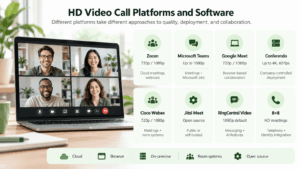
The platforms below take different approaches to HD calling. Some prioritize cloud meetings and browser access. Others focus on enterprise collaboration, room systems, or company controlled deployment.
Zoom
Zoom supports both 720p HD and 1080p Full HD video, but availability depends on the plan, account configuration, hardware, meeting format, and other requirements.
720p Group HD is available in qualifying configurations. Full HD 1080p has additional account, device, and meeting requirements and should not be assumed to apply to every ordinary call.
Other capabilities include screen sharing, webinars, live streaming, meeting recording, breakout rooms, virtual backgrounds, waiting rooms, participant controls, captions, and connectivity with compatible SIP or H.323 systems.
Suitable for: organizations that need cloud meetings, external participant access, and webinar workflows.
HD consideration: check the exact account, device, and meeting requirements if 1080p is an operational requirement rather than an optional quality improvement.
Microsoft Teams
Microsoft Teams combines meetings with messaging, Microsoft 365 collaboration, calendar integration, telephony options, and centralized administration.
Teams can transmit video at resolutions up to 1920 × 1080 depending on the scenario, device, available processing resources, meeting configuration, and network conditions.
The platform also includes screen sharing, recordings, live captions, meeting transcripts, breakout rooms, background effects, participant roles, lobby controls, webinars, town halls, and enterprise identity integration.
For organizations already using Microsoft 365, Teams can connect meetings with calendars, files, documents, directory services, and other collaboration workflows.
Suitable for: organizations already using Microsoft 365 and wanting meetings inside the same productivity environment.
HD consideration: actual video resolution is adaptive and can vary between participants during the same call.
Google Meet
Google Meet supports 720p and 1080p video, although Full HD sending depends on account edition, compatible hardware, camera capability, browser support, and available computing resources.
Full HD sending requires a compatible 1080p camera and sufficient processing capacity. Availability also depends on the Google Workspace edition and meeting configuration.
Meet includes browser based joining, screen sharing, captions, recordings on supported editions, background effects, breakout rooms, polls, moderation options, and close integration with Google Calendar and other Google Workspace services.
Suitable for: organizations centered on Google Workspace and users who prefer browser based meetings.
HD consideration: 1080p availability depends on both the subscription and endpoint.
Conferendo
Conferendo takes a different approach from cloud first meeting platforms. It is a software video conferencing and corporate messaging server that organizations can deploy on their own infrastructure.
Conferendo documentation states that its client applications support 4K Ultra HD video calls and conferences at up to 60 frames per second in compatible configurations. The platform supports conferences with up to 2000 participants and integration with SIP, H.323, and RTSP devices.
The platform also includes personal and group chats, channels, file exchange, screen sharing, conference scheduling, participant management, recording, streaming, corporate address books, and browser access for meeting participants.
Conferendo can operate inside a corporate network without a mandatory Internet connection. Server capabilities also include LDAP and LDAPS integration, Active Directory integration, QoS support, API access, and support for multiple video codecs.
For meeting rooms, Conferendo Room can be used with the broader Conferendo infrastructure and compatible SIP, H.323, and RTSP equipment.
Suitable for: enterprises that need HD or 4K video conferencing on company controlled infrastructure, including local or isolated networks.
HD consideration: organizations must size server resources, endpoints, cameras, displays, and networks for the required video quality and simultaneous meeting load.
Cisco Webex
Cisco Webex supports multiple video resolutions, including 720p and 1080p in compatible configurations. Cisco has expanded the maximum resolution of individual Webex video streams to 1080p for supported devices and applications.
Webex combines meetings with screen sharing, video layouts, virtual backgrounds, reactions, live captions, meeting locks, lobbies, host and cohost roles, participant audio controls, and noise reduction. Cisco Board, Desk, and Room devices can also start and join Webex meetings directly, which makes the platform relevant to managed meeting room environments.
Content sharing behavior can differ from camera video. Cisco documents different resolution and frame rate combinations for content optimized for text and content optimized for motion.
Webex also supports breakout sessions in applicable meeting configurations and on supported room devices, allowing participants to work in smaller groups during a larger meeting.
Suitable for: enterprises combining software meetings, conference room devices, managed collaboration, and centralized administration.
HD consideration: distinguish between camera stream resolution, content sharing resolution, received layout resolution, and room device capabilities.
Jitsi Meet
Jitsi Meet is an open source video conferencing platform that can be used through the public Jitsi service, embedded into another product, or deployed on an organization’s own infrastructure.
Jitsi supports common web browsers and mobile devices, while its interfaces and software development kits allow organizations to integrate meetings into web and native applications. Self hosted deployments are available through common Linux packages and container based configurations.
The platform includes chat, screen sharing, tile layouts, participant controls, lobby functionality, audio and video moderation, prejoin screens, noisy microphone detection, and breakout rooms. Administrators can enable or disable many of these functions in a self hosted deployment.
Recording can be handled locally or through additional components. Self hosted environments can use Jibri for recording and live streaming, while RTMP based streaming can be configured for external streaming services or an organization’s own infrastructure.
Jitsi can also be integrated with SIP audio through the Jigasi gateway, although this requires additional configuration and should not be treated as a default feature of every installation.
Suitable for: technical teams that value open source software, extensibility, and control over their conferencing deployment.
HD consideration: practical video quality depends strongly on deployment configuration, endpoint capability, server resources, codec behavior, and network design.
RingCentral Video
RingCentral Video combines video meetings with business communications and collaboration tools.
The current RingCentral Video desktop experience uses Full HD 1080p video by default and adjusts quality dynamically according to computer performance and available resources. RingCentral also documents high resolution screen sharing and audio enhanced sharing for compatible content.
Meeting participants can join from supported browsers without installing a desktop application. Collaboration tools include screen sharing, interactive whiteboards, annotations, breakout rooms, meeting recordings, virtual backgrounds, and the ability to move meetings between desktop and mobile devices.
RingCentral also provides live transcription, captions, translated transcripts, meeting summaries, notes, action items, and live recaps through its AI meeting features. Recordings and related meeting materials can be shared with internal or external participants using access controls.
Dynamic end to end encryption is available for meetings where organizations need an additional security option. RingCentral also supports longer form meeting formats through its wider meetings, webinar, town hall, and room product family.
Suitable for: businesses that want HD video meetings integrated with cloud telephony, messaging, collaboration, and AI assisted meeting workflows.
HD consideration: 1080p support still depends on endpoint capability, application version, computer resources, and network conditions.
8×8
8×8 provides HD video and audio conferencing as part of its business communications environment.
Standard 8×8 Meet sessions support large active meetings across browsers, desktop applications, mobile applications, and dial in access. The platform also provides larger meeting formats that combine active participants with viewers.
Meeting functions include screen and audio sharing, virtual backgrounds, cloud recording, moderator controls, participant lobbies, host delegation, calendar integrations, live streaming, personal meeting spaces, and room deployments through 8×8 Spaces.
8×8 also provides post meeting information such as participant engagement, recordings, chat history, polls, highlights, content snapshots, meeting summaries, and action items. Active Directory and Okta can be used for identity integration and single sign on in supported configurations.
Optional end to end encryption can be enabled for supported meetings. When it is active, some cloud based features may be unavailable, which is an important operational consideration for organizations evaluating meeting security.
Suitable for: businesses that want HD meetings alongside cloud telephony, messaging, room systems, identity integration, and larger meeting options.
HD consideration: the vendor describes HD video conferencing broadly rather than presenting one fixed camera resolution for every meeting type and endpoint.
HD Video Call Platform Comparison
|
Platform |
Documented video capability |
Deployment model |
Main functionality |
|---|---|---|---|
|
Zoom |
720p and 1080p in qualifying configurations |
Cloud |
Meetings, webinars, recordings, and external participant access |
|
Microsoft Teams |
Up to 1080p in supported scenarios |
Cloud |
Meetings, messaging, Microsoft 365 integration, and enterprise administration |
|
Google Meet |
720p and 1080p on supported plans and devices |
Cloud |
Browser meetings and Google Workspace integration |
|
Conferendo |
Up to 4K and up to 60 fps in supported configurations |
Company controlled server |
Local networks, enterprise messaging, SIP and H.323 integration |
|
Cisco Webex |
Up to 1080p individual video streams in supported configurations |
Cloud and managed enterprise environment |
Meetings, room devices, content sharing, and enterprise administration |
|
Jitsi Meet |
Quality depends on deployment and configuration |
Public service or self hosted |
Open source meetings, embedding, customization, and self hosting |
|
RingCentral Video |
1080p in supported desktop configurations |
Cloud |
Video meetings, telephony integration, whiteboards, transcription, and AI meeting tools |
|
8×8 |
HD video conferencing |
Cloud |
Meetings, telephony, messaging, identity integration, and large meeting options |
The table should not be read as a quality ranking. Resolution labels are implemented differently across products, and many platforms adjust video quality dynamically according to endpoint capability, meeting layout, subscription, and network conditions.
How to Choose an HD Video Call Platform?

Choosing a platform based only on the largest resolution number is usually a mistake.
A business should first identify where high resolution actually matters. A one to one executive call, a twenty person gallery meeting, a webinar, and a conference room session all use video differently.
A practical evaluation can follow five steps:
- Define the required visual quality. Decide whether 720p is enough or whether the organization has real use cases for 1080p or 4K.
- Test real endpoints. Use the actual laptops, webcams, room cameras, monitors, mobile devices, and conference room systems that employees will use.
- Measure network conditions. Test calls from offices, homes, branch locations, and other relevant networks while monitoring bandwidth, latency, jitter, and packet loss.
- Check administrative requirements. Evaluate identity integration, participant controls, recordings, logging, data location, security policies, and room interoperability.
- Run meetings at realistic scale. A successful one to one Full HD call does not prove that the same infrastructure can support dozens of simultaneous HD conferences.
Common Misconceptions About HD Video Calls
The first misconception is that camera resolution equals call resolution. It does not. A 4K camera may send a 720p stream if the service, endpoint, subscription, or network cannot support more.
The second misconception is that 1080p is always visibly better. If every participant appears in a small gallery tile, the extra pixels may have little effect.
The third misconception is that video quality is mainly a bandwidth problem. CPU load, GPU acceleration, codecs, lighting, camera exposure, frame rate, packet loss, and software processing can all change the result.
The fourth misconception is that the highest supported resolution represents normal quality for every call. Conferencing systems frequently use adaptive media. Resolution can rise or fall during the same meeting.
HD Video Calls and Security
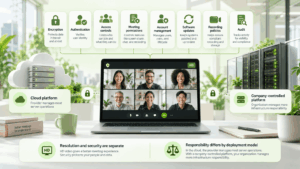
Higher resolution does not make a video call more or less secure by itself.
Security should be evaluated separately through encryption, authentication, access controls, meeting permissions, account management, software updates, recording policies, audit capabilities, and infrastructure ownership.
Deployment is especially important for organizations with strict internal requirements. A cloud platform places most server operations with the provider. A company controlled platform such as Conferendo or a self managed Jitsi installation places more infrastructure responsibility with the organization.
Neither model is automatically safer. They assign operational responsibility differently.
Is 4K Video Conferencing Worth It?

For many desktop calls, Full HD is enough.
4K becomes more relevant when video is displayed on large conference room screens, a camera captures several people from a distance, physical products or technical objects must remain detailed, or organizations want higher quality dedicated room systems.
The tradeoff is greater infrastructure demand. Cameras, capture hardware, displays, codecs, processors, server resources, and network capacity all need to support the chosen quality.
For this reason, 4K should be treated as a use case requirement, not simply as a feature that every company needs.
Conclusion
An HD video call is usually a video connection at 720p or above, while 1080p provides Full HD and some business platforms support 4K. Actual quality depends on the entire communication chain, including cameras, processing hardware, codecs, bandwidth, packet loss, frame rate, software settings, and the receiving endpoint.
When selecting an HD video call platform, compare real meeting scenarios instead of maximum resolution alone. Cloud services, open source deployments, and company controlled server platforms distribute infrastructure responsibility differently, so organizations should test video quality, network behavior, administrative controls, room equipment, and simultaneous meeting load before choosing a system.
Frequently Asked Questions
What Does HD Mean in a Video Call?
HD generally refers to video at 1280 × 720 pixels or higher. Full HD refers to 1920 × 1080 pixels. Some enterprise conferencing systems also support 4K video.
Is 720p Enough for a Video Call?
Yes, 720p is sufficient for many personal and business meetings. Full HD becomes more useful when video is displayed at a larger size or when facial, product, or room detail is important.
How Much Internet Speed Do I Need for a 1080p Video Call?
Requirements vary by platform, codec, frame rate, and meeting configuration. In practice, organizations should plan for several Mbps per active Full HD stream and test the actual conferencing platform under realistic network conditions.
Why Does My 1080p Webcam Look Blurry During Calls?
The conferencing service may reduce the video resolution or bitrate because of network conditions, processor load, account settings, meeting layout, or platform restrictions. Poor lighting can also make a high resolution camera appear soft or noisy.
Can Video Calls Use 4K Resolution?
Yes. Some enterprise conferencing systems support 4K video in compatible configurations. The camera, display, endpoint, network, software configuration, and server resources all need to support the required quality.
Is Full HD Necessary for Business Video Conferencing?
Not always. 720p can be sufficient for everyday meetings, while 1080p is more useful for large displays, client presentations, training, product demonstrations, and conference rooms. Stability and audio quality should normally take priority over maximum resolution.
What Should I Test Before Choosing an HD Video Conferencing Platform?
Test video quality, audio, bandwidth use, processor load, mobile and desktop clients, screen sharing, meeting room equipment, administrative controls, and performance with realistic participant numbers. For larger deployments, test multiple simultaneous conferences rather than relying only on one demonstration call.